| Main Feature CYBEREYE
(Intrusion/Fire/Emergency)protects your family and your possessions. Economic
CYBEREYE protect you and your family 24 hours a day without any additional
fees. Automatical Telephone Dialer CYBEREYE will call the specified 7
numbers(phone, mobile, pager) automatically as soon as it detects an Intrusion
or the early stages of a fire and will inform you of what is being detected
by the 3 recorded messages(Intrusion, Fire, Emergency) with your own voice.
Two Way Communication In addition, you can monitor the surrounding area
of CYBEREYE device through its microphone by calling it from wherever
you are. When you decide that this is an intrusion, you can scare the
burglar away with your voice or the siren. (Example : You can send a message
directly to the Intruder. " Hey, get out of there! The police are on their
way!") Emergency Call When something happens to an aged person or patient,
he or she may recieve assistance immediately by pressing the "EMERGENCY"
button on the remote control. CYBEREYE will try to call the 7 specified
numbers continuously until all the numbers have been called, and there
is a response Arming By a Call When you forget to arm the system, you
can activate it with only a call after entering your password. Built in
Rechargeable Batteries Rechargeable batteries will hold CYBEREYE's mission
and data even in the case of a power failure. Easy Operation Keypad and
LCD(Liquid Crystal Display) make it easy to change incorrect data and
the numbers. Sensor Expansion Because CYBEREYE will call the specified
numbers with different messages and let you know the situation, one person
can handle more than 1 CYBEREYE at once.(Up to 70 sensors may be installed
with 1 main unit.) Compact Size Though a small size (204mm x 96mm x 45mm),
CYBEREYE has multi-functional and can be installed, simply, by the customer.
|
|
|
|
|
|
 INSTALLATION
PROCEDURE As one can see in the diagram, turn ON the switch in the back
of the sensor by using a sharp object. As soon as it's ON, the sensor
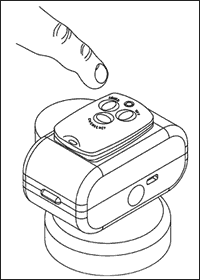
will light up a red light. As seen on the diagram below, place the remote
controller on top of the sensor and press any button you prefer as soon
as that happens, the red light will be turned OFF and the codes of wireless
sensor will correspond to the main unit After inputting the code as
described above, place the system where it wouldn't be seen directly
by an intruder. * CAUTION : The sensor must be placed more than, 1m
above the floor ground and there shouln't be any obstacles in front
of the sensor itself. INSTALLATION
PROCEDURE As one can see in the diagram, turn ON the switch in the back
of the sensor by using a sharp object. As soon as it's ON, the sensor
will light up a red light. As seen on the diagram below, place the remote
controller on top of the sensor and press any button you prefer as soon
as that happens, the red light will be turned OFF and the codes of wireless
sensor will correspond to the main unit After inputting the code as
described above, place the system where it wouldn't be seen directly
by an intruder. * CAUTION : The sensor must be placed more than, 1m
above the floor ground and there shouln't be any obstacles in front
of the sensor itself.
|
| |
|
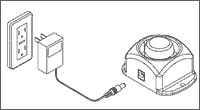
INSTALLATION PROCEDURE As shown in the diagram below, connect the
jack into the center side of wireless siren and plug it into the power
outlet near the place where you'd like to install it. Within 5seconds
after initial switch ON. press the "ARMED" button on the the remote
controller and as you will hear a "beep beep" sound, the code will correspond
with other devices
 .
* If you press "off" button Instead "ARMED" after power ON. Siren Will
be begin to wail after 16 seconds as soon as receiving signals from
other peripheral devices. CONFIRMING THE INSTALLATION PROCESS To confirm
press the "OFF" button from the remote controller and you will hear
a "beep" sound. If it does not work the way it's supposed to, unplug
the jack from the adaptor and retry installing the siren once again
as described earlier. ARMING AND DISARMING PROCEDURE Using the remote
controller of "CYBER", one is able to arm or disarm the siren. By pressing
the "ARMED" button. the siren becomes armed and makes a "beep beep"
sound. By pressing the "OFF" button. the system automatically disarms
itself and a "beep" sound follows afterwards. By pressing the "EMERGENCY"
button. immediately the siren will begin wailing for 30 seconds. While
the siren is wailing aloud. If one presses the "OFF" button from the
remote controller. the siren stops automatically. After 3 seconds as
soon as the "CYBEREYE's" By pressing the "OFF" button. peripheral devices,
such as a wireless door sensor, a digital camera, perceive a movement,
the siren will begin to wail for 30 seconds. And it repeats the same
procedure when detecting again. * siren is not operated by "CYBEREYE's"
main unit. CHIME BELL FUNCTION It a state where the system is disarmed,
the sire has a chime bell function. When a signal from the wireless
door sensor, it gives out a "chime bell" sound. When wanting to turn
"OFF" the chime bell function, one should press both the "ARMED" and
the "OFF" buttons at the same time. A "chime bell" sound comes up and
lets one know it is OFF. If one want to use that function. press both
the same time and one would know it's back ON due to the "chime bell"
sound. .
* If you press "off" button Instead "ARMED" after power ON. Siren Will
be begin to wail after 16 seconds as soon as receiving signals from
other peripheral devices. CONFIRMING THE INSTALLATION PROCESS To confirm
press the "OFF" button from the remote controller and you will hear
a "beep" sound. If it does not work the way it's supposed to, unplug
the jack from the adaptor and retry installing the siren once again
as described earlier. ARMING AND DISARMING PROCEDURE Using the remote
controller of "CYBER", one is able to arm or disarm the siren. By pressing
the "ARMED" button. the siren becomes armed and makes a "beep beep"
sound. By pressing the "OFF" button. the system automatically disarms
itself and a "beep" sound follows afterwards. By pressing the "EMERGENCY"
button. immediately the siren will begin wailing for 30 seconds. While
the siren is wailing aloud. If one presses the "OFF" button from the
remote controller. the siren stops automatically. After 3 seconds as
soon as the "CYBEREYE's" By pressing the "OFF" button. peripheral devices,
such as a wireless door sensor, a digital camera, perceive a movement,
the siren will begin to wail for 30 seconds. And it repeats the same
procedure when detecting again. * siren is not operated by "CYBEREYE's"
main unit. CHIME BELL FUNCTION It a state where the system is disarmed,
the sire has a chime bell function. When a signal from the wireless
door sensor, it gives out a "chime bell" sound. When wanting to turn
"OFF" the chime bell function, one should press both the "ARMED" and
the "OFF" buttons at the same time. A "chime bell" sound comes up and
lets one know it is OFF. If one want to use that function. press both
the same time and one would know it's back ON due to the "chime bell"
sound.
|
| |
|
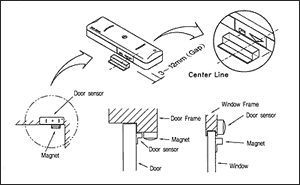 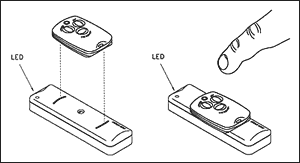
INSTALLATION PROCEDURE Turn ON the switch which is
located on the side of the wireless door sensor with a sharp object,
and once it's ON, the red light from LED of the door sensor will begin
blinking. As shown in the Diagram (1), place the remote controller on
top of the door sensor and press any button. The red light eill then
shut itself OFF and the codes will automatically go into agreement within
both systems in order for a more convenient use. The door sensor is
to be installed onto a door and/or a window as shown in the Diagram
(2). ¡Ø There shouldn't be more than 1.2cm distance between the door
sensor and the magnet for normal usage. (Depending on the quality of
the door/window, the distance between the door sensor and the magnet
might be shortened.)
|
| |
| |